





-
 Epson EcoTank L18050 Printer
KShs 100,000.00Original price was: KShs 100,000.00.KShs 93,000.00Current price is: KShs 93,000.00. -
Epson EcoTank L8100 Printer
KShs 78,000.00Original price was: KShs 78,000.00.KShs 71,800.00Current price is: KShs 71,800.00. -
Epson EcoTank L6370 Printer
KShs 70,000.00Original price was: KShs 70,000.00.KShs 64,900.00Current price is: KShs 64,900.00. -
Epson LQ-2190 24-Pin Wide-Format Dot Matrix Printer
KShs 100,000.00Original price was: KShs 100,000.00.KShs 98,000.00Current price is: KShs 98,000.00.



-9%

HP DeskJet Ink Advantage 2975 All-in-One Printer Price in Kenya
Original price was: KShs 11,000.00.KShs 9,500.00Current price is: KShs 9,500.00.

E-POS ECO AF250 High-Speed Thermal Receipt Printer (epos-af250-printer)
Original price was: KShs 17,000.00.KShs 15,000.00Current price is: KShs 15,000.00.
Kyocera ECOSYS FS-1025MFP Monochrome Multi-Function Laser Printer (kyocera-ecosys-fs-1025mfp)
Original price was: KShs 55,000.00.KShs 50,000.00Current price is: KShs 50,000.00.
-
Brand/Model: Kyocera ECOSYS FS-1025MFP (Monochrome Multi-Function Laser Printer)
-
Functions: Print, Copy, Scan
-
Print & Copy Speed: Up to 25 ppm (A4 monochrome)
-
Print Resolution: 1,200 dpi quality (1,800 x 600 dpi)
-
Duplex Printing: Automatic two-sided printing standard
-
Document Feeder: 40-sheet Automatic Document Feeder (ADF)
-
Paper Capacity: Standard 250-sheet universal cassette
-
Connectivity: High-speed USB 2.0, 10/100Base-TX Ethernet
-
Key Technology: ECOSYS long-life components for eco-friendly, low-cost-per-page operation
-
Best For: Home offices, small businesses, administrative desks, and budget-conscious professionals needing reliable mono printing, copying, and scanning
-
Store Category: Printers and Scanners
ng rapid print speeds of up to 25 ppm, automatic double-sided printing, and standard network connectivity, this durable 3-in-1 device combines printing, scanning, and copying to deliver exceptionally low operational costs
Description
Exam Printers in Kenya: How Schools, Colleges and Exam Centres Can Choose the Right Machine
Every term, thousands of Kenyan schools face the same challenge: printing continuous assessment tests, mid-term papers, mock exams and end-of-year examinations on time, on budget and without leaks. Choosing the right exam printers in Kenya is therefore not a small purchasing decision. The wrong machine breaks down in the middle of exam week, wastes toner, jams paper and leaves teachers working late. The right one prints hundreds of clean, readable papers quietly and reliably, term after term.
This guide explains how to choose exam printers in Kenya based on volume, cost per page, security and after-sales support. You will learn about the main machine types, the features that matter, how to calculate real running costs, and which mistakes to avoid. If you are still comparing general office machines, our guide to laser jet printers in Kenya covers the basics, while this article focuses on high-volume exam work.
What Are Exam Printers?
“Exam printers” is not a technical category on a manufacturer’s website. It is a practical label for machines that can handle the demanding workload of school and institutional assessment printing. In practice, exam printers in Kenya are heavy-duty monochrome laser printers, multifunction devices with finishing options, digital duplicators and sometimes production copiers. What they share is a high duty cycle, fast print speeds, large paper capacity and a low cost per page.
A small home printer is not designed for this work. Printing two hundred copies of a ten-page paper means two thousand pages, and a lightweight machine will overheat, jam or wear out within a season. Dedicated exam printers in Kenya are built for sustained output, using durable drums, strong fusers and large toner cartridges that can print many thousands of pages before needing replacement. That durability is what separates a smart school purchase from a repeated expense.
Why Schools Need Dedicated Exam Printing Equipment
The first reason is volume. A secondary school with eight hundred students may print tens of thousands of pages in a single exam week, covering every subject and class. Relying on commercial printing shops for this work is expensive and, as we explain later, risky. Investing in proper exam printers in Kenya lets the school control cost, timing and confidentiality, and it often pays for itself within a few terms.
The second reason is timing. Teachers frequently finalise papers late, and the school cannot postpone an exam because a shop was busy. In-house exam printers in Kenya give you the flexibility to print last-minute corrections, replacement papers and revision materials whenever needed. This independence is especially valuable during national assessment periods, when schools operate under strict schedules set by bodies such as the Kenya National Examinations Council (KNEC).
The third reason is cost control. Outsourced printing is usually charged per page, and the bill grows with every term. Owning exam printers in Kenya converts that variable cost into a predictable one made up of toner, paper, power and servicing. When you calculate the cost per page, in-house printing is almost always cheaper for any school printing more than a few thousand pages per month, and the savings increase as enrolment grows.
Types of Exam Printers in Kenya
Several machine types can serve as exam printers in Kenya, and each suits a different school size and budget. Understanding the differences prevents costly overspending or underbuying. The four main options are described below, with the strengths and weaknesses of each.
Heavy-Duty Monochrome Laser Printers
These are the most common choice because they are simple, reliable and affordable. High-volume mono lasers print 40 to 70 pages per minute, support duplex printing and use high-yield toner. For small and medium schools, they are the easiest exam printers in Kenya to install and maintain, because staff already understand how to operate them. They connect by USB or network, so several teachers can send jobs from their computers.
Multifunction Laser Printers With Finishing
A multifunction printer adds scanning and copying, and advanced models include stapling, sorting and booklet finishing. This makes them powerful exam printers in Kenya for schools that need collated, stapled papers ready for distribution. Scanning is also useful for digitising marked scripts and storing records. The higher price is justified when staff time spent collating and stapling by hand is considered, especially in large schools.
Digital Duplicators
Digital duplicators, often associated with the Risograph style of printing, use a master stencil and ink drum to produce very large numbers of identical copies at extremely low cost per page. Brands such as Riso and Duplo are widely used in institutions that print thousands of copies of the same paper. As exam printers in Kenya, they excel for big runs of a single document but are less flexible than laser machines for small or varied jobs.
Production Photocopiers
Large digital photocopiers from makers like Ricoh and Kyocera combine printing, copying and scanning at high speed with enormous paper capacity. For colleges, universities and exam centres, these are among the most capable exam printers in Kenya, handling constant daily output. They cost more upfront and require service contracts, but the productivity, finishing options and durability suit organisations printing very large volumes every day.
Key Features to Look for in Exam Printers
Before comparing models, write down what your school actually needs. The following specifications matter most when evaluating exam printers in Kenya, and they should guide every quotation you request:
- Print speed: at least 40 pages per minute for medium and large schools.
- Monthly duty cycle: well above your peak exam-month volume.
- Duplex printing: automatic two-sided printing to halve paper use.
- Paper capacity: large trays or add-on cassettes to avoid constant refilling.
- Toner yield: high-capacity cartridges to reduce interruptions.
- Finishing: stapling, sorting, or booklet making for assembled papers.
Duty cycle and paper capacity deserve extra attention. A machine rated for ten thousand pages a month will struggle if you print fifty thousand during exam season, so choose exam printers in Kenya whose recommended monthly volume comfortably exceeds your busiest period. Large input trays are equally important, because a machine that needs reloading every few minutes slows the whole exercise and increases the chance of paper mix-ups.
Network connectivity also helps. When teachers can send papers securely from their own computers to a shared machine, the exam office avoids passing around flash disks that may carry viruses or leave confidential files behind. Look for exam printers in Kenya with Ethernet, Wi-Fi and user authentication, so every print job is traceable to a specific staff member, and access can be controlled.
Exam Security and Confidentiality
Exam leaks damage a school’s reputation and can have serious consequences for students and staff. When papers are printed at an external shop, many people handle the files and the printed sheets, and you lose control over who sees them. Choosing in-house exam printers in Kenya means the document never leaves your premises, which is the strongest protection you can offer, provided the machine is placed in a secure room.
Technology can add further safeguards. Many modern exam printers in Kenya support PIN-protected release, where a job prints only after the teacher enters a code at the machine. This stops papers from sitting unattended in the output tray. Some devices also let administrators restrict access, track usage by user and clear stored job data automatically. These features are invaluable for exam-sensitive environments where a single missing page can cause a crisis.
Policy matters as much as hardware. Designate a small, trusted team to operate your exam printers in Kenya, keep the printing room locked, count sheets in and out, and securely destroy spoiled copies. Guidance from the Ministry of Education and KNEC on exam handling should inform your internal procedures. A good printer helps, but disciplined processes ensure the technology actually protects your papers.
Matching the Machine to Your Institution
Different institutions need different capacity, so avoid copying what another school bought without checking your own numbers. Start by estimating pages per term: multiply the number of students by the pages per paper, by the number of papers, by the number of assessments. This simple exercise tells you what you truly need from exam printers in Kenya, and it often reveals that the school needs either a stronger machine or a second backup unit.
Primary schools and smaller secondary schools typically do well with one or two heavy-duty mono laser printers or a multifunction device. Their exam printers in Kenya need to be dependable and economical rather than extremely fast. A backup machine is wise, because a single breakdown during assessments can disrupt the whole timetable. Many primary schools also print Competency Based Curriculum assessments and worksheets, which add to monthly volume.
Large secondary schools, boarding schools, colleges and exam centres often combine technologies. They may use a digital duplicator for big runs of identical papers, a fast multifunction device for finishing and scanning, and a smaller laser printer for ad hoc jobs. This layered approach to exam printers in Kenya spreads the workload, reduces wear on any single machine, and keeps printing going even if one device is out of service.
Understanding the Real Cost Per Page
The sticker price of a printer rarely reflects its true cost. For example, in Kenya, the most useful number is the cost per page, which you calculate by dividing the price of a toner cartridge or master roll by its rated page yield, then adding paper and an allowance for servicing. A cheaper machine with expensive consumables often costs far more over three years than a higher-priced model with efficient toner.
Laser machines usually offer a moderate cost per page and excellent flexibility, while digital duplicators have a very low cost per page for large runs but higher setup costs for each master. When schools compare exam printers in Kenya, they should estimate how many copies of each paper they print. If one paper is printed in hundreds of copies, a duplicator may win. If runs are small and varied, a laser printer is usually better.
Do not forget the hidden costs. Starter toner cartridges may hold only part of the normal yield, drums and fusers wear out and eventually need replacement, and power and paper add up quickly. Before buying exam printers in Kenya, ask the supplier for the price of every consumable and the expected lifespan of each part. Write these figures into a simple spreadsheet so management can see the full cost over a year or two.
Popular Brands Available in Kenya
Reliable brands make life easier because parts, toner, and technicians are easier to find. HP, Canon and Brother are common names among exam printers in Kenya, particularly for mono laser and multifunction machines. You can review their ranges on the HP, Canon and Brother websites. These brands are well known, widely stocked, and supported by many technicians across the country.
For heavier workloads, Kyocera, Ricoh and Xerox are popular choices, and their machines are known for high page yields and durable construction. Many institutions choosing exam printers in Kenya at the production level look to these brands and negotiate service contracts for regular maintenance. Whatever brand you pick, make sure it is officially distributed locally so that you receive a genuine warranty and a dependable supply of spare parts.
Paper, Toner and Supplies
Even the best machine performs poorly with bad supplies. Exam papers are usually printed on standard 70 to 80 gsm paper, and low-quality sheets cause jams, double feeds, and dust that shortens the life of your exam printers in Kenya. Buy paper from reliable suppliers, store it in a dry place and keep reams sealed until needed. Humidity makes paper curl, which leads to jams exactly when you cannot afford them.
Toner choice also matters. Genuine toner offers consistent quality and protects your warranty, whereas compatible toner is cheaper but varies widely in quality. For critical exam work, many schools prefer genuine toner or a trusted compatible brand for their exam printers in Kenya. Stock extra cartridges before exam season, because supply delays and sudden shortages are far more expensive than keeping a small reserve in the store.
Power, Dust and Environment
Kenyan schools often deal with unstable electricity, and sudden outages can damage the fuser and electronics of exam printers in Kenya. Use a surge protector or a properly rated UPS, and if possible connect the machine to a stabilised supply. Remember that laser printers draw heavy power when warming up, so small computer UPS units may not be suitable. Consult your supplier about the right protection for your model.
Chalk dust, open windows and poor ventilation also shorten the life of your equipment. Keep exam printers in Kenya in a clean, secure, well-ventilated room, away from direct sunlight, rain splash, and classroom dust. A dedicated printing room is ideal because it supports both security and machine care. A clean room, stable power and good paper handling together prevent many of the most common breakdowns.
Where to Buy and What to Verify
Buy from a supplier who can deliver, install, and support the equipment. The market for exam printers in Kenya includes authorised distributors, office equipment dealers and informal importers, and service quality varies. A reputable supplier such as Plannettech Investors Limited can recommend suitable models, supply genuine toner and provide servicing, which saves headaches long after the purchase is complete.
Request a written quotation that lists the model, warranty period, included toner, delivery and installation. Confirm whether the machine is brand new and ask about local technicians and spare parts. For schools buying several exam printers in Kenya at once, discuss bundled pricing and a service agreement. You can contact the Plannettech team for a tailored quotation, or browse the printers category to compare options.
Also consider procurement rules. Public and private institutions often need competitive quotations, formal invoices and documented specifications. When purchasing exam printers in Kenya, ask suppliers for a clear specification sheet, a signed quotation and warranty documentation so your finance office can process payment and audit the purchase properly. Good paperwork protects the school if a dispute ever arises.
Maintenance Tips for Long Life
Heavy use demands regular care. Wipe the exterior, clean the paper rollers, use quality paper and clear jams gently along the paper path. Operators of exam printers in Kenya should be trained to avoid pulling paper forcefully, because torn scraps left inside cause repeated jams. Keep firmware and drivers up to date and record every fault in a simple log so patterns become visible.
Plan servicing before exam season rather than after a breakdown. Ask your technician to inspect rollers, fuser, drum and cartridges at least once a term. If prints show faint lines, grey backgrounds, or repeating marks, replace the relevant part immediately. Scheduled care keeps exam printers in Kenya productive when it matters most, and it is far cheaper than emergency repairs during the busiest week of the year.
Common Mistakes Schools Make
The most frequent mistake is buying a machine that is too small. A school may purchase an office-grade printer to save money, only to see it fail within months under exam load. When choosing exam printers in Kenya, always size the machine for peak volume, not average volume. Buying once and buying correctly is cheaper than replacing a weak printer after a single exam season.
Another mistake is ignoring consumables and support. Some buyers focus only on the purchase price and discover that toner is scarce, technicians are far away or the warranty is invalid because the printer was grey-imported. Others skip staff training and security procedures. Planning the full lifecycle of your exam printers in Kenya, including supplies, servicing and confidentiality, prevents these problems and keeps examination periods calm.
Frequently Asked Questions
What are the best exam printers in Kenya for a secondary school?
For most secondary schools, a high-speed mono laser or multifunction printer with duplex printing and large trays works best. Larger schools may add a digital duplicator. The best exam printers in Kenya are those whose duty cycle comfortably exceeds your peak monthly volume.
How many pages per minute should an exam printer print?
Medium schools generally benefit from 40 pages per minute or more. Smaller schools can manage with slower machines, but exam printers in Kenya with higher speeds reduce waiting time during busy exam weeks.
Is a duplicator better than a laser printer for exams?
Duplicators are cheaper per page for large runs of identical papers, while laser printers are more flexible. Many institutions combine both types of exam printers in Kenya to balance cost and convenience.
Can exam printers in Kenya be used for other school work?
Yes. The same machines print notes, report forms, circulars, worksheets, and administrative documents. Multifunction models also scan and copy, making them useful across the whole school.
How do I keep exam papers confidential?
Print in-house, restrict access to a trusted team, use PIN-protected printing and keep the room locked. Secure handling combined with well-chosen exam printers in Kenya greatly reduces the risk of leaks.
Final Thoughts
A good printer quietly supports every exam your school sets. By estimating volume, comparing cost per page, prioritising security and choosing a supplier with reliable after-sales service, you can select the right exam printers in Kenya with confidence. The goal is not the cheapest machine on the market but the one that delivers clean, confidential, on-time papers for years.
If you are ready to upgrade your school’s printing, explore the printers range at Plannettech or request a quotation tailored to your enrolment and budget. With the guidance above and the right exam printers in Kenya, your next examination period can run smoothly from the first paper to the last.
Reviews (0)
You must be logged in to post a review.
Shipping & Delivery


Related products


Canon Scan Lide 300 Scanner
SPECIFICATIONS
[button et_class="" target="_blank" style="large" url="https://wa.me/254743144607" icon="" title="ORDER HERE"]
| Media Type | Photo ; Receipt ; Business Card ; Paper |
| Scanner Type | Photo, Document |
| Brand | Canon |
| Model Name | CanoScan |
| Connectivity Technology | USB |
| Item Dimensions LxWxH | 14.5 x 9.9 x 1.7 inches |
| Resolution | 2400 |
| Item Weight | 3.6 Pounds |
| Wattage | 4.5 watts |
| Sheet Size | 2400 dots_per_inch |

Epson EcoTank L5290
-
Brand/Model: Epson EcoTank L5290 (Wi-Fi All-in-One Ink Tank Printer)
-
Functions: Print, Copy, Scan, Fax with Automatic Document Feeder (ADF)
-
Ink System: Integrated high-capacity ink tank system for ultra-low cost-per-page printing (zero cartridges)
-
Print Resolution: Up to 5,760 x 1,440 dpi for sharp text and vibrant color output
-
Connectivity: Wi-Fi, Wi-Fi Direct, Ethernet, and High-Speed USB 2.0
-
Mobile Printing: Epson Smart Panel app, Apple AirPrint, and Mopria Print Service support
-
Paper Handling: Integrated front-facing ink tanks and reliable daily media input capacity
-
Best For: Home offices, small businesses, and busy workgroups in Kenya needing economical 4-in-1 multifunction performance
-
Store Category: Printers and Scanners

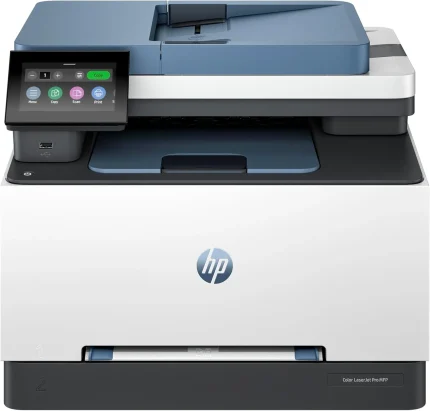


HP Deskjet 2320 All In One Printer
Printers & Scanners in Kenya, HP Printers, multi-function ( copy, scan, print), Black Friday Printers
HP Thermal Inkjet Print Technology:
- Supports Duplex printing
- Print Resolution: Up to 4800 x 1200 optimized dpi color
- Print Smart Software Features: Manual Duplex
- Scan technology: Contact Image Sensor (CIS)
- Scan Resolution: Up to 1200 x 1200 dpi (Hardware), Up to 1200 dpi (optical)
- Scan File output, PNG, JPEG, BMP, TIFF, and PDF,
- Scan input modes: Front-panel scan
- Copier Settings: Auto-enlarge
- Maximum No. of copies: Up to 9 copies
- Copy Resolution: Up to 600 x 300 dpi
- Support paper types include types: Plain paper, Photo paper, Brochure paper
- Supports current Windows and Mac Operating Systems
- 1-year warranty

HP LaserJet Pro 4003dn Printer (2Z609A)
Model & Performance: HP LaserJet Pro 4003dn (2Z609A) is a high-speed monochrome laser printer designed for reliable business delivering speeds of up to 40 pages per minute.
-
- Automatic Duplex Printing: Save paper and improve productivity with built-in automatic two-sided printing.
- Professional Mono Output: Produces sharp, clear black-and-white documents for reports, invoices, letters, and everyday office printing.
- Network Connectivity: Connect easily through Hi-Speed USB and Gigabit Ethernet for dependable office network printing.
- Compatible Toner: Uses HP 148A and HP 148X Black LaserJet Toner Cartridges for standard and high-yield printing needs.
- Ideal for Business Use: A reliable choice for small businesses, busy offices, and workgroups requiring fast, efficient monochrome printing.
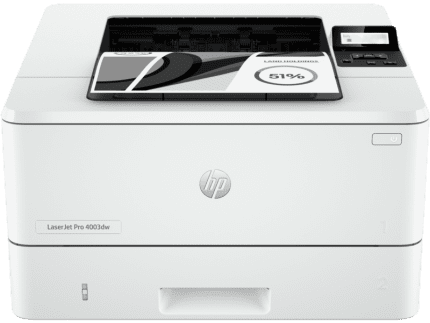
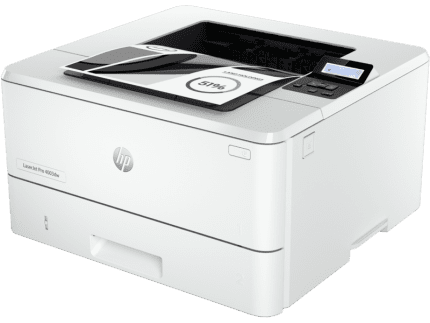
HP LaserJet Pro 4003dw Printer
-
- High-Speed Performance: The HP LaserJet Pro 4003dw Printer (2Z610A) delivers fast monochrome printing at speeds of up to 40 pages per minute, making it ideal for busy offices and workgroups.
- Wireless & Network Ready: Connect easily through Wi-Fi, Ethernet, or Hi-Speed USB for flexible printing from multiple devices.
- Automatic Duplex Printing: Save paper and reduce printing costs with built-in automatic two-sided printing.
- Professional Mono Output: Produce sharp, clear black-and-white documents for invoices, reports, contracts, letters, and everyday business printing.
- Flexible Toner Options: Compatible with HP 149A and HP 149X Black LaserJet Toner Cartridges, giving you standard and high-yield printing options.
- Built for Business: A reliable print-only monochrome laser printer for small businesses, offices, and demanding workgroups.

HP Smart Tank 580 All-in-One Printer
Enjoy everyday reliability with the HP Smart Tank 580 All-in-One Printer that delivers HP quality you expect and savings that are anything but expected 1
- Functions: Print, copy, scan, wireless
- Print speed: Print speed up to 12 ppm (black) and 5 ppm (color) 2
- Print quality black (best): Up to 1200 x 1200 rendered dpi







Reviews
There are no reviews yet.