


QuickBooks Online KRA Integration in Kenya: The Complete eTIMS Guide

If your business keeps its books in QuickBooks, you have probably asked the same question as many Kenyan finance teams: how do we connect QuickBooks to the Kenya Revenue Authority? Getting QuickBooks Online KRA integration in Kenya right is no longer optional. KRA expects businesses to issue tax invoices through the Electronic Tax Invoice Management System (eTIMS), and how your accounting software handles that link affects your VAT returns, deductible expenses, and customer relationships.
The difficulty is that QuickBooks Online was built for a global market, while eTIMS is a Kenya-specific system with its own registrations, device types, and data rules. That gap is why QuickBooks Online KRA integration in Kenya confuses so many accountants, business owners, and IT teams. Some assume it works out of the box. Others assume it is impossible. The truth sits somewhere in between.
In this guide, we explain what eTIMS expects from your invoices, which routes exist for QuickBooks Online KRA integration in Kenya, how to set one up step by step, and which mistakes to avoid. By the end, you will know how to plan your integration without disrupting daily invoicing.
A quick note before we begin: tax rules and software features change often. Confirm current requirements on the KRA website or with a registered tax agent before you commit to any setup.
What Is eTIMS and Why Does It Matter for QuickBooks Users?
eTIMS is KRA’s electronic tax invoicing platform. Instead of printing invoices that KRA only sees later through returns, businesses transmit sales data to KRA as invoices are issued, and KRA’s system validates them. According to the KRA eTIMS FAQ, the eTIMS software is provided free of charge, including the online portal and the client software. That detail matters when you plan QuickBooks Online KRA integration in Kenya, because the KRA side of the setup should not carry a licence fee. Any cost usually comes from the connector, development work, or consulting you need to link it to your books.
For a QuickBooks user, the practical meaning is simple. QuickBooks is where you create invoices, but eTIMS is where KRA expects them to be recorded. Every invoice you raise needs a matching, validated record on eTIMS, and the details on both sides must agree. That is the heart of QuickBooks Online KRA integration in Kenya: keeping two systems in step so the invoice your customer holds is the same invoice KRA holds.
A compliant eTIMS invoice normally carries your KRA PIN, the buyer’s PIN where relevant, itemised goods or services with the correct tax classification, and KRA-generated validation details such as a QR code. If your QuickBooks invoice template cannot show those details, your QuickBooks Online KRA integration in Kenya is incomplete, even if the data reaches KRA behind the scenes. Always confirm the exact invoice fields KRA requires for your business type.
Why QuickBooks Online KRA Integration in Kenya Matters Now
Three pressures are pushing businesses to act, and each one raises the stakes of QuickBooks Online KRA integration in Kenya.
The first is your customers’ tax position. Under recent Kenyan tax changes, businesses generally need eTIMS-validated invoices to support expense claims and input VAT. If you issue invoices that are not on eTIMS, your customers may struggle to claim those costs, and they will start asking you for compliant documents. We recommend confirming the exact deductibility rules with a tax advisor, but the commercial effect is already clear: customers prefer suppliers who invoice correctly.
The second pressure comes from government work. On 31 August 2026, KRA announced that eTIMS had been integrated with IFMIS, the government’s financial management system. Suppliers to government entities must generate valid eTIMS invoices before submitting for payment, and the invoice details must match the eTIMS record. Kenyans.co.ke reported that the change is meant to speed up payments through automated checks. If your clients include county governments, ministries, or state agencies, QuickBooks Online KRA integration in Kenya directly affects whether you get paid on time.
The third pressure is operational. Without integration, staff often create the invoice in QuickBooks and then retype it into the eTIMS portal. That doubles the workload and invites mismatches in amounts, item names, and dates. A well-planned QuickBooks Online KRA integration in Kenya removes that double entry, shortens month-end reconciliation, and reduces the risk of penalties for incorrect or missing invoices.
OSCU, VSCU and the eTIMS Online Portal Explained
KRA offers three main ways to use eTIMS, and choosing the right one is the first decision in any QuickBooks Online KRA integration in Kenya project.
The online portal is a browser-based option suited to taxpayers who supply services only. It works from any browser with a stable connection, but invoices are created inside the KRA portal rather than in QuickBooks, so it is not true integration.
The Online Sales Control Unit (OSCU) is a system-to-system option for taxpayers using an online invoicing system. Your software sends each sale to KRA as it happens and receives validation details back. Because QuickBooks Online is cloud-based, OSCU is the model most people have in mind when they talk about QuickBooks Online KRA integration in Kenya.
The Virtual Sales Control Unit (VSCU) is also system-to-system, but it is aimed at taxpayers with large transaction volumes or bulk invoicing, and it is generally suited to businesses whose transactions are not always online.
Which option applies depends on your business type and what KRA approves for you, so confirm this during registration. The Tally eTIMS guide offers a plain-language overview of the two integration types, even if you do not use Tally. For QuickBooks Online KRA integration in Kenya, the key point is that OSCU or VSCU is what lets invoices raised in QuickBooks reach KRA automatically.
Does QuickBooks Online Connect Directly to eTIMS?
This is the question most readers want answered, so here is the honest position. At the time of writing, we could not confirm a native, KRA-certified connector built by Intuit for eTIMS. In a QuickBooks community thread from September 2026, a QuickBooks team member advised users to open All Apps, choose Integration transactions, search for eTIMS, and select Get integration now. If the app is not listed, it is not supported for direct integration, and the user should contact the eTIMS support team about options.
In practice, that means you should check the QuickBooks app marketplace first. If a certified listing appears, review who built it, what KRA approvals it holds, and how it handles failed transmissions. If nothing appears, QuickBooks Online KRA integration in Kenya will need a bridge: a third-party connector, middleware, or a custom build that sits between QuickBooks and KRA.
Availability changes quickly, so treat this section as a prompt to verify, not a final answer. Ask any vendor to demonstrate a live invoice moving from QuickBooks to eTIMS before you pay. A credible QuickBooks Online KRA integration in Kenya should show the KRA validation response inside or alongside the QuickBooks record.
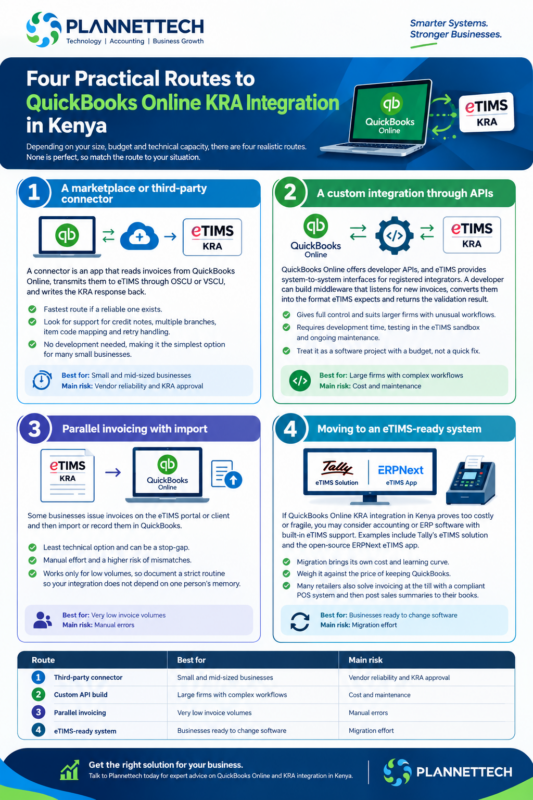
Four Practical Routes to QuickBooks Online KRA Integration in Kenya
Depending on your size, budget, and technical capacity, there are four realistic routes. None is perfect, so match the route to your situation.
Route 1: A marketplace or third-party connector
A connector is an app that reads invoices from QuickBooks Online, transmits them to eTIMS through OSCU or VSCU, and writes the KRA response back. This is the fastest route if a reliable one exists. Look for support for credit notes, multiple branches, item code mapping and retry handling when KRA is unreachable. For many small businesses, this is the simplest form of QuickBooks Online KRA integration in Kenya because it needs no development.
Route 2: A custom integration through APIs
QuickBooks Online offers developer APIs, and eTIMS provides system-to-system interfaces for registered integrators. A developer can build middleware that listens for new invoices, converts them into the format eTIMS expects and returns the validation result. This route gives full control and suits larger firms with unusual workflows, but it requires development time, testing in the eTIMS sandbox and ongoing maintenance when either side changes. Treat custom QuickBooks Online KRA integration in Kenya as a software project with a budget, not a quick fix.
Route 3: Parallel invoicing with import
Some businesses issue invoices on the eTIMS portal or client and then import or record them in QuickBooks. This is the least technical option and can be a stop-gap. The downside is manual effort and a higher risk of mismatches, so it works only for low volumes. If you choose it, document a strict routine so your QuickBooks Online KRA integration in Kenya does not depend on one person’s memory.
Route 4: Moving to an eTIMS-ready system
If QuickBooks Online KRA integration in Kenya proves too costly or fragile, you may consider accounting or ERP software with built-in eTIMS support. Examples include Tally’s eTIMS solution and the open-source ERPNext eTIMS app. Migration brings its own cost and learning curve, so weigh it against the price of keeping QuickBooks. Many retailers also solve invoicing at the till with a compliant POS system and then post sales summaries to their books.
| Route | Best for | Main risk |
|---|---|---|
| Third-party connector | Small and mid-sized businesses | Vendor reliability and KRA approval |
| Custom API build | Large firms with complex workflows | Cost and maintenance |
| Parallel invoicing | Very low invoice volumes | Manual errors |
| eTIMS-ready system | Businesses ready to change software | Migration effort |
Step-by-Step: Setting Up QuickBooks Online KRA Integration in Kenya
Follow these steps in order. Skipping the early ones is the most common reason integrations fail.
Step 1: Confirm your tax status. Check that your KRA PIN is active, your iTax profile is up to date and your obligations are correct. A mismatch here can block onboarding. Use the KRA iTax portal to review your details before you start QuickBooks Online KRA integration in Kenya.
Step 2: Onboard to eTIMS. Register through the KRA website, the eCitizen route or a KRA office. The KRA eTIMS FAQ lists the support emails and onboarding options, and KRA staff can assist in person at their offices and iTax service centres.
Step 3: Choose OSCU or VSCU. Confirm which system-to-system option KRA assigns to your business, and gather the details you will need, which typically include your PIN, branch ID and a registered device serial number. These come from KRA or your tax consultant, not from QuickBooks.
Step 4: Pick your integration route. Choose from the four routes above. Write down who is responsible for support after go-live, because QuickBooks Online KRA integration in Kenya needs a named owner.
Step 5: Clean your QuickBooks data. Before connecting, tidy your customer and product lists. Make sure every customer has a correct KRA PIN where applicable, names are consistent and duplicate items are merged. Dirty data produces rejected invoices.
Step 6: Map items and tax codes. eTIMS expects each item to carry KRA’s item classification and the right tax category. Map every product and service in QuickBooks to the correct codes, and align your VAT rates in QuickBooks with how KRA classifies them. Wrong mapping is one of the top sources of errors in QuickBooks Online KRA integration in Kenya.
Step 7: Test in the sandbox. KRA provides a sandbox where you can test transmissions without affecting real records. Test normal invoices, credit notes, discounts, mixed tax rates and failed connections. Production access requires KRA’s approval, so do not assume that a working sandbox means you can go live.
Step 8: Go live gradually. Start with one branch or a small group of customers, compare QuickBooks and eTIMS records daily for the first few weeks, and then scale. A phased launch makes QuickBooks Online KRA integration in Kenya far less stressful.
Step 9: Train your team. Show staff how to issue, correct and cancel invoices properly. Explain that changes after submission should go through credit notes or KRA’s approved correction process, not silent edits.
Setting Up Tax Codes and Item Mapping in QuickBooks Online
Because tax mapping causes so many problems, it deserves its own section in any QuickBooks Online KRA integration in Kenya plan.
In QuickBooks Online, tax rates and tax codes control how VAT appears on invoices and reports. For Kenyan businesses, set up codes for standard-rated, zero-rated and exempt sales, and make sure each one has a clear counterpart on eTIMS. Rates and classifications can change with new finance laws, so review them whenever KRA or the National Treasury announces an update.
Next, look at your items. Each product or service in QuickBooks needs a stable internal name, a unit of measure and the correct KRA classification. Goods and services can be treated differently, and some products have special tax treatment. If you sell hundreds of items, build a mapping spreadsheet and review it with your accountant before you upload anything. That spreadsheet becomes the backbone of your QuickBooks Online KRA integration in Kenya.
Finally, think about discounts, bundled products and shipping charges. These are the cases where QuickBooks totals and eTIMS totals often drift apart by small amounts. Decide in advance how each case should be recorded, and test it. Even a small difference can cause an invoice to be rejected or flagged for review.
Common Mistakes to Avoid
Teams repeat the same errors in QuickBooks Online KRA integration in Kenya projects. Watch for these:
- Assuming a connector is KRA-approved. Ask for proof, not promises. A vendor should explain how it connects to eTIMS and what approvals it holds.
- Ignoring failed transmissions. Networks drop. Make sure your setup queues invoices and alerts someone when KRA does not respond, otherwise invoices may sit unreported.
- Editing invoices after submission. Fix mistakes with credit notes and reissued invoices, following KRA’s process, so QuickBooks and eTIMS stay aligned.
- Skipping buyer PINs. Where a customer needs to claim expenses or input VAT, the buyer’s PIN must be correct on the invoice. Collect it at onboarding.
- Mismatched rounding. Different rounding rules between QuickBooks and eTIMS lead to small differences. Test with realistic invoices.
- Forgetting government work. After the eTIMS-IFMIS change, invoices submitted to government entities must match eTIMS exactly. Check these invoices first.
- No owner after go-live. A QuickBooks Online KRA integration in Kenya needs someone responsible for monitoring, updates and KRA communications.
Hardware and Infrastructure Checklist
Even the best QuickBooks Online KRA integration in Kenya depends on the equipment and connectivity around it. Because OSCU is an online option, KRA notes that online solutions need a stable internet connection. Consider a primary fibre or broadband line plus a mobile data failover, especially for branches in areas with patchy coverage.
Next, think about devices and printing. Invoice printers, receipt printers, barcode scanners and reliable computers all affect how smoothly staff can issue compliant invoices. Retail and hospitality businesses often pair QuickBooks with an eTIMS-ready POS system and then sync sales into the books. If you are choosing equipment, the Plannettech team can advise on eTIMS devices and POS systems that fit your volume.
Finally, protect your data. Keep backups of your QuickBooks exports and your eTIMS records, restrict who can issue or cancel invoices, and use strong passwords with multi-factor authentication for both QuickBooks and your KRA accounts. A secure setup keeps your QuickBooks Online KRA integration in Kenya reliable and audit-ready.
How to Choose a QuickBooks Online KRA Integration Partner
Whether you hire a developer, buy a connector or ask your accountant to coordinate, put these questions to every candidate:
- Can you demonstrate a live invoice going from QuickBooks Online to eTIMS, with the KRA validation shown?
- Which eTIMS option do you use, OSCU or VSCU, and what approvals do you hold?
- How are credit notes, debit notes and cancellations handled?
- What happens when KRA’s system is unavailable?
- Who provides support, during what hours and at what cost?
- How will you handle updates when KRA changes its specifications?
A partner who answers clearly is more likely to deliver QuickBooks Online KRA integration in Kenya that survives the next rule change. Also ask for references from Kenyan businesses of similar size to yours.
Frequently Asked Questions About QuickBooks Online KRA Integration in Kenya
Is QuickBooks Online KRA integration in Kenya mandatory? KRA’s guidance is that businesses should issue invoices through eTIMS, and the obligation covers most taxpayers, so check your own status with KRA. How you connect QuickBooks, whether by connector, custom build or a manual routine, depends on your situation.
Does QuickBooks Online have a built-in eTIMS feature? We could not confirm one at the time of writing. Check All Apps and Integration transactions in your QuickBooks account, and ask QuickBooks support or an eTIMS provider.
Can I just use the eTIMS portal and skip integration? The portal is intended for service-only taxpayers and works in a browser. It can be a stop-gap, but it does not link your QuickBooks invoices automatically, so it is not full QuickBooks Online KRA integration in Kenya.
How long does QuickBooks Online KRA integration in Kenya take? Registration and approvals depend on KRA, while the build or connector setup depends on your route. A simple connector setup may take days to weeks and a custom build longer. Plan for proper testing time.
Where can I get help from KRA? KRA lists eTIMS support at [email protected] and [email protected], and you can also visit a KRA office or iTax service centre.
Conclusion
QuickBooks Online KRA integration in Kenya is achievable, but it is a project, not a switch. Confirm your eTIMS onboarding, decide between OSCU and VSCU, pick the route that fits your size, test in the sandbox and go live in phases. Keep your tax codes, item mappings and customer PINs clean, and make sure someone owns the process after launch.
With the eTIMS-IFMIS integration now in place for government suppliers, delaying makes less sense each month. Start by checking the QuickBooks marketplace, speak to your accountant and set a realistic timeline.
If you need help with the equipment side of compliance, from eTIMS devices and POS systems to printers and networking, contact Plannettech and we will help you build a setup that supports your QuickBooks Online KRA integration in Kenya from day one.