





-
 Epson EcoTank L18050 Printer
KShs 100,000.00Original price was: KShs 100,000.00.KShs 93,000.00Current price is: KShs 93,000.00. -
Epson EcoTank L8100 Printer
KShs 78,000.00Original price was: KShs 78,000.00.KShs 71,800.00Current price is: KShs 71,800.00. -
Epson EcoTank L6370 Printer
KShs 70,000.00Original price was: KShs 70,000.00.KShs 64,900.00Current price is: KShs 64,900.00. -
Epson LQ-2190 24-Pin Wide-Format Dot Matrix Printer
KShs 100,000.00Original price was: KShs 100,000.00.KShs 98,000.00Current price is: KShs 98,000.00.


-17%

TP-Link 5-Port 10/100Mbps Desktop Switch TL-SF1005D
Original price was: KShs 3,000.00.KShs 2,500.00Current price is: KShs 2,500.00.
TP-Link 8-Port 10/100Mbps Desktop Switch TL-SF1008D
Original price was: KShs 3,500.00.KShs 2,500.00Current price is: KShs 2,500.00.
TP-LINK 150 MBPS WIRELESS NPCI EXPRESS ADAPTOR TL – WN781ND
Original price was: KShs 3,000.00.KShs 2,500.00Current price is: KShs 2,500.00.
Brand: TP-Link
Model: TL-WN781ND
Keyphrase: TP-Link 150Mbps Wireless N PCI Express Adapter TL-WN781ND
Function: Adds internal Wi-Fi to desktop PCs via PCI Express slot
Speed: Up to 150Mbps
Frequency: 2.4GHz band only
Antenna: Detachable omni-directional (RP-SMA connector)
Low-Profile Bracket: Included for slim/compact computer cases
Plug & Play: Windows 10/11 auto-detects
Best for: Desktops without built-in Wi-Fi, home offices, gaming
Description
Description of TP-LINK 150 MBPS WIRELESS NPCI EXPRESS ADAPTOR TL – WN781ND
Does your desktop computer still rely on a messy Ethernet cable running across your floor? Are you tired of laggy USB Wi-Fi dongles that overheat and disconnect at the worst moments? The TP-Link 150Mbps Wireless N PCI Express Adapter TL-WN781ND is the professional-grade solution you need. This internal Wi-Fi card plugs directly into your desktop motherboard, giving you stable, high-speed wireless connectivity without the clutter.
The TP-Link 150Mbps Wireless N PCI Express Adapter TL-WN781ND is designed specifically for desktop computers that lack built-in Wi-Fi or have outdated wireless hardware. Unlike USB adapters that sit outside your PC case and can overheat, this PCI Express card installs securely inside your computer, connecting directly to the motherboard for superior reliability and consistent performance -3.
Why Choose a PCI Express Wi-Fi Card Over USB?
Many desktop users start with a USB Wi-Fi dongle because it seems easier. However, these tiny adapters have significant drawbacks. They can overheat during heavy use, causing disconnections. They are easily knocked or damaged. They often provide weaker signal reception because their small antennas are hidden behind your PC case.
The TL-WN781ND solves all these problems. It connects directly to your motherboard via a PCI Express slot (x1, x4, x8, or x16—any will work) -6. This gives you a rock-solid connection that never wobbles. The included detachable omni-directional antenna with 2dBi gain can be positioned for optimal signal reception, far away from the interference of your PC’s metal case -1-5.
Technical Specifications That Matter
The TP-Link 150Mbps Wireless N PCI Express Adapter TL-WN781ND complies with IEEE 802.11n standards and is backward compatible with 802.11b/g -6. This means it works with virtually any Wi-Fi router, old or new. Key features include:
-
Wireless Speed: Up to 150Mbps—perfect for HD streaming, video calls, online gaming, and large file downloads -1
-
Frequency: 2.4GHz band, offering excellent range through walls and floors -1
-
Security: Supports 64/128-bit WEP, WPA, and WPA2 encryption to keep your network safe from intruders -6
-
Detachable Antenna: RP-SMA connector allows you to upgrade to a larger antenna for even better range -5-6
Easy Installation Process
Installing the TP-Link 150Mbps Wireless N PCI Express Adapter TL-WN781ND is straightforward, even for beginners. Follow these simple steps -5-10:
-
Turn off your computer and unplug the power cable
-
Open the case panel to access the motherboard
-
Locate an available PCI-E slot (x1, x4, x8, or x16—the card fits any)
-
Remove the slot cover from your PC case
-
Carefully insert the adapter into the slot until it clicks firmly
-
Secure the card with the retaining screw
-
Attach the included antenna to the threaded port on the card’s bracket
-
Close your case, reconnect power, and boot up
Once Windows loads, the adapter will be detected automatically. For Windows 8, 10, and 11, the driver installs automatically -4-8. For older versions like Windows 7 or XP, use the included Resource CD or download the latest drivers from TP-Link’s website -4-9.
Who Is This For?
-
Desktop owners who want to eliminate Ethernet cables
-
Gamers who need a stable, low-latency connection (the PCIe interface provides better responsiveness than USB) -3
-
Home office workers who need reliable Wi-Fi for video calls
-
Students setting up a desktop in a dorm room
-
System integrators building PCs without built-in Wi-Fi
Important Note Regarding 5GHz Networks
This adapter operates on the 2.4GHz band only. It does not support 5GHz networks -3-8. For most home and office users, 2.4GHz is ideal because it offers better range through walls. However, if you specifically need 5GHz for ultra-fast speeds at short range, consider TP-Link’s Archer series adapters instead.
In the Box (standard packaging) -1-5-6:
-
TL-WN781ND Wireless Adapter
-
Detachable Omni-directional Antenna (RP-SMA)
-
Low-Profile Bracket (for slim computer cases)
-
Resource CD with drivers and utility
-
Quick Installation Guide
For a clean, reliable, and permanent Wi-Fi solution for your desktop PC, the TP-Link 150Mbps Wireless N PCI Express Adapter TL-WN781ND is an excellent choice at an affordable price point.
Reviews (0)
You must be logged in to post a review.
Shipping & Delivery


Related products

D-Link DES-1016A 16-Port 10/100 Mbps Unmanaged Desktop Switch
Brand: D-Link
Model: DES-1016A
Function: Expands one Ethernet connection into sixteen ports for wired networking
Speed: 10/100 Mbps per port (Fast Ethernet)
Plug & Play: Yes – no configuration required
Energy Saving: 802.3az Green Ethernet – reduces power consumption during idle periods and on shorter cables
Fanless: Silent operation for home or office
Design: Sturdy metal case, desktop or rack-mountable with included brackets
Best for: Small to medium offices, workgroups, IP camera systems, POS networks, schools

D-Link DGS-1016D 16-Port 10/100/1000 Mbps Unmanaged Gigabit Rackmount Switch
Brand: D-Link
Model: DGS-1016D
Function: Provides 16 Gigabit Ethernet ports for high-speed wired network expansion
Ports: 16 x 10/100/1000 Mbps Gigabit RJ45 ports with Auto MDI/MDIX
Switching Capacity: 32 Gbps non-blocking
MAC Address Table: 8,000 entries
Plug & Play: Yes – no configuration required
Smart Features: 3-pin DIP switch for EEE, Flow Control, Port Isolation, and Storm Control
QoS: IEEE 802.1p Quality of Service for voice and video traffic prioritization
Jumbo Frame: Up to 10,000 Bytes support
Energy Saving: IEEE 802.3az Energy Efficient Ethernet with D-Link Green Technology
Housing: Sturdy fanless metal case, silent operation
Mounting: Desktop or 19-inch rack-mountable (brackets included)
Cable Diagnostics: Front-panel LEDs for cable fault identification
Best for: SOHO, small-to-medium businesses, server rooms, IT workgroups, education, gaming

D-Link DGS-1024D 24-Port 10/100/1000 Mbps Unmanaged Gigabit Rackmount Switch
Brand: D-Link
Model: DGS-1024D / DGS-1024C
Function: Provides 24 Gigabit Ethernet ports for high-speed wired network expansion
Speed: 10/100/1000 Mbps per port (Gigabit Ethernet) with non-blocking architecture
Switching Capacity: 48 Gbps
Plug & Play: Yes – no configuration required
Smart Features: DIP switch for Port Isolation, Storm Control, EEE, and Flow Control
Energy Saving: IEEE 802.3az Green Ethernet – automatically powers down inactive ports
Housing: Sturdy metal case, silent fanless design
Mounting: Desktop or 19-inch rack-mountable (brackets included)
Best for: Small-to-medium businesses, IT workgroups, server rooms, schools, large-scale IP camera networks

D-Link DGS-1210-28P 28-Port Gigabit Smart Managed PoE Switch
Brand: D-Link
Model: DGS-1210-28P
Function: Provides 24 PoE+ Gigabit ports plus 4 Gigabit Combo SFP/RJ45 uplinks in a smart managed Layer 2+ switch
Ports: 24 x 10/100/1000 Mbps PoE+ RJ45 ports + 4 x Gigabit SFP/RJ45 Combo ports
PoE Standard: IEEE 802.3af (PoE) and IEEE 802.3at (PoE+), up to 30W per port
PoE Budget: 193 Watts total
Switching Capacity: 56 Gbps
Management: Smart Managed L2+ with Web GUI, CLI, SNMP
Smart Features: Auto Voice VLAN, Auto Surveillance VLAN, Static Routing, IGMP Snooping, Spanning Tree (STP/RSTP/MSTP), Link Aggregation (LACP)
Security: 802.1X Access Control, ACL, ARP Spoofing Prevention, DHCP Server Screening, D-Link Safeguard Engine
Energy Saving: IEEE 802.3az EEE, D-Link Green Technology
Housing: Metal case, 19-inch rack-mountable (1U), 2 built-in fans
Best for: SMBs, enterprise access layers, IP surveillance systems, wireless access deployments, VoIP networks

D-Link DGS-F1010P-E 10-Port Gigabit Long Range PoE+ Surveillance Switch
Brand: D-Link
Model: DES-1016D
Function: Expands one Ethernet connection into sixteen ports for wired networking
Speed: 10/100 Mbps per port (Fast Ethernet)
Plug & Play: Yes – no configuration required
Energy Saving: 802.3az Green Ethernet – reduces power consumption during idle periods
Housing: Sturdy metal case for durability and heat dissipation
Mounting: Desktop or 19-inch rack-mountable with included brackets
Fanless: Silent operation for office environments
Best for: Small to medium offices, workgroups, server rooms, IP camera systems, structured cabling setups
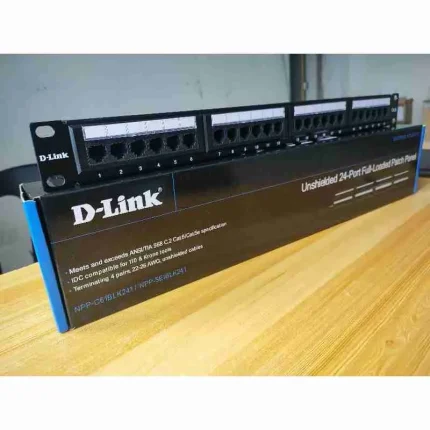
D-Link NPP-C61BLK241 Cat6 24-Port Fully Loaded Patch Panel
Brand: D-Link
Model: NPP-C61BLK241
Function: Terminates and organizes up to 24 Cat6 Ethernet cable runs in a structured cabling environment
Type: Cat6 UTP Fully Loaded Patch Panel
Ports: 24 RJ45 ports, 8P8C
Mounting: Standard 19-inch rack-mountable, 1U height
Wiring Schemes: T568A and T568B supported
Termination: IDC punch-down, compatible with 110 and Krone tools
Design: SPCC steel panel with Black RAL 9005 finish, rear cable management bar
Best for: Server rooms, data centers, office structured cabling, IT closets, network organization

TP-LINK AC1300 ARCHER T3U WIRELESS MU-MINO USB ADAPTOR
-
Brand: TP-Link
-
Model: Archer T3U (TL-ARCHER T3U)
-
Keyphrase: TP-Link Archer T3U AC1300 Mini Wireless MU-MIMO USB Adapter
-
Function: Adds dual-band AC Wi-Fi to desktops and laptops via USB
-
Speed: AC1300 – 400 Mbps (2.4 GHz) + 867 Mbps (5 GHz) -1
-
Interface: USB 3.0 (10x faster than USB 2.0) -2
-
Technology: MU-MIMO for efficient multi-device performance -5
-
Design: Mini / Nano size – plugs in and stays
-
Best for: Desktop PCs, older laptops, gaming, HD streaming, home offices

Ubiquiti U-POE-AT-EU Adapter
- Reliable Gigabit PoE+ injector for powering Ubiquiti access points and network devices
- Delivers stable power and data transmission through a single Ethernet cable
- Ideal for office networks, hotels, schools, CCTV systems, and business installations
- Supports high-speed Gigabit networking performance for seamless connectivity
- Compact and durable design for professional networking environments







Reviews
There are no reviews yet.